REimagine Home
Introducing our revolutionary Generative AI tool that can effortlessly redesign any room in seconds. With its cutting-edge technology, you can easily transform your space into something truly remarkable and unique. …
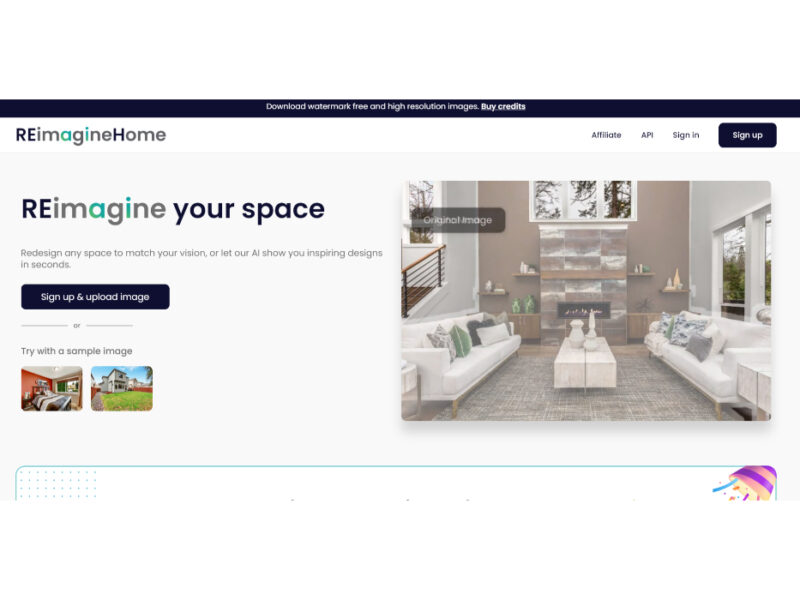
About REimagine Home
Use Cases
Use Case 1: Virtual Staging for Real Estate Listings
Problem: Selling a vacant home is challenging because buyers often struggle to visualize the potential of an empty, cold space. Physical staging is expensive, requiring furniture rentals and professional movers, which can delay a listing by weeks.
Solution: Real estate professionals can use the "Virtual Staging" and "Occupied → Vacant" tools to digitally furnish empty rooms or replace a current tenant’s cluttered furniture with high-end, modern decor.
Example: An agent takes a photo of a cluttered living room. They use the "Empty Your Space" feature to remove all existing furniture and then apply "Virtual Staging" to add a contemporary sofa, rug, and art pieces, creating a professional-grade listing photo in minutes.
Use Case 2: Visualizing Home Renovations and Material Swaps
Problem: Homeowners and interior designers often hesitate to start expensive renovations like replacing flooring or cabinets because they aren't sure if the new materials will look good in the specific lighting and architecture of their room.
Solution: The "Surface Restyling" and "Furniture Facelift" tools allow users to recolor or retexture existing elements of a room without changing the structural layout.
Example: A homeowner considering a kitchen remodel uploads a photo of their current kitchen. They use the tool to swap dark wooden cabinets for "Light Oak" and replace old linoleum with "White Marble Tiles." This allows them to "try before they buy" and finalize their design choices with confidence.
Use Case 3: Contextual Marketing for Furniture and Decor Brands
Problem: E-commerce brands selling furniture or home decor need high-quality "lifestyle shots" to show products in real-world settings. Traditional photoshoots are incredibly costly, requiring studios, lighting, and multiple set changes.
Solution: Brands can use the "Add Anything" and "Swap Furniture & Objects" features to place their products into various high-quality room templates or real customer photos.
Example: A rug company uploads a basic photo of a living room. Using the tool, they swap out the existing rug for their new seasonal product and use "Style Swap" to generate three different versions of the room (Modern, Rustic, and Minimalist) to see which style resonates most with their target audience on social media.
Use Case 4: Landscaping and Outdoor Curb Appeal Proposals
Problem: Outdoor professionals (landscapers and hardscapers) often find it difficult to sell a vision of a transformed backyard when the current state is just dirt, dead grass, or a dated patio.
Solution: The "Landscaping," "Lawn Replacement," and "Pool Add/Treat" tools allow pros to create "after" photos that show the full potential of an outdoor space before a single shovel hits the ground.
Example: A landscaping contractor takes a photo of a client’s patchy, brown backyard. They use "Lawn Replacement" to show lush green grass, "Hardscaping" to add a stone patio, and "Day to Dusk" to create a premium, atmospheric lighting effect for the final pitch presentation.
Use Case 5: Seasonal and Festive Content Creation for Influencers
Problem: Content creators and real estate marketers need to keep their social media feeds fresh and relevant to the time of year, but redecorating a physical space for every holiday (Christmas, Halloween, Spring) is time-consuming and wasteful.
Solution: The "Seasonal Reset" and "Festive Flip" features allow users to instantly change the season or holiday theme of any interior or exterior photo.
Example: A lifestyle blogger takes one high-quality photo of their front porch in July. In October, they use the "Festive Flip" tool to add pumpkins and autumn decor. In December, they use "Seasonal Reset" to add a dusting of snow and holiday lights, maintaining a thematic feed with minimal effort.
Key Features
- Automated room decluttering and vacancy
- AI-driven functional room repurposing
- One-click architectural style swapping
- AI landscaping and hardscaping redesign
- Dynamic day-to-dusk lighting transformation
- Intelligent surface and texture restyling
- Seasonal and festive decor resetting
- Conversational AI interior design companion
Similar Tools You Might Like
Discover more tools in the same category
Icebreaker
Icebreaker AI is an innovative solution designed to automate and enhance the process of creating …


WTF Does This Company Do?
Welcome to our landing page, where you can explore and engage with our website solely …

Youtube Summarizer - Syllaby
Youtube Summarizer – Syllaby is an innovative tool designed for users who frequently use YouTube …

Explore Related Categories
Live Preview:
Updates automatically with live stats
Copied to clipboard!