Magicflow
Magicflow is an innovative productivity tool designed to enhance focus and reduce distractions. It uses live flow timers, distraction warnings, and a unique flow meter to assist users in maintaining …
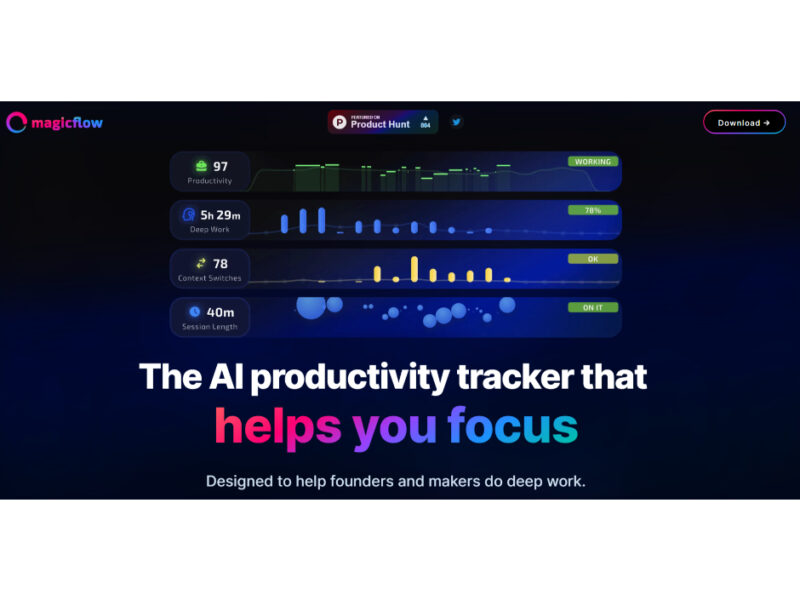
About Magicflow
Use Cases
Use Case 1: Optimizing Deep Work for Startup Founders
Problem: Founders often wear multiple hats, leading to constant context switching between high-level strategy and low-level administrative tasks. This makes it difficult to enter a "flow state" for critical tasks like pitch deck creation or product roadmapping.
Solution: Magicflow’s focus sessions and live flow timers help founders carve out dedicated blocks for deep work. Unlike passive trackers, it provides distraction warnings if the user drifts toward non-essential sites or apps during a session.
Example: A founder starts a 90-minute "Product Strategy" focus session. When they instinctively try to open their email inbox 20 minutes in, Magicflow triggers a distraction warning, helping them stay on task until the flow meter is filled.
Use Case 2: Data-Driven Workflow Adjustments for Developers
Problem: Developers may spend hours at their desks but struggle to identify which parts of their day are actually productive versus which are lost to "rabbit holes" or inefficient debugging sessions.
Solution: The tool uses automatic time tracking and real-time productivity metrics to visualize focus quality. It provides actionable insights rather than just raw data, allowing developers to see exactly what affects their focus.
Example: A developer reviews their "Weekly Report" and notices their focus metrics are 40% lower on Tuesday afternoons due to frequent Slack interruptions. Based on Magicflow's recommended actions, they decide to move their "Deep Work" coding blocks to early morning and set Slack to "Do Not Disturb" during those hours.
Use Case 3: Managing Creative Output for Content Creators
Problem: Content creators often struggle with "productive procrastination," where they feel busy but aren't making progress on their primary goals (like scriptwriting or video editing) because of social media "research" distractions.
Solution: Magicflow’s "Track what's distracting you" feature helps creators get real about where their time is going. The glowing flow meter serves as a gamified visual cue that encourages them to maintain focus on their creative software.
Example: A YouTuber starts a focus session to write a video script. They use the Pomodoro timer integration to work in 25-minute sprints. Magicflow tracks their time automatically, and at the end of the day, they receive a report showing that they stayed in "Flow" for 4 hours, giving them a clear sense of achievement and a record of their most productive hours.
Use Case 4: Performance Coaching for Students and Researchers
Problem: Students often lose track of time while researching, finding it difficult to balance intense study periods with necessary breaks, leading to burnout or "fake work."
Solution: Magicflow acts as a personal productivity coach by offering recommended focus actions and a 30-day history to identify long-term habits. The tool's ability to "see what’s affecting focus" helps students understand their cognitive peaks.
Example: A research student uses the free trial to track their thesis writing. Magicflow identifies that their focus peaks between 10 AM and 12 PM. The tool suggests "Recommended focus actions," such as tackling the most complex citations during that window, helping the student finish their chapter ahead of schedule.
Key Features
- Automatic time tracking
- Real-time productivity metrics
- Live flow focus timers
- Actionable AI focus recommendations
- Real-time distraction warnings
- Visual glowing flow meter
- Detailed focus history reports
- Personal distraction tracking analysis
Similar Tools You Might Like
Discover more tools in the same category
GitMind AI
GitMind is a dynamic and free collaborative mind-mapping software that serves as a powerful tool …

Product Manager OS
Product Manager OS is a comprehensive AI-powered toolkit specifically crafted for Product Managers, designed to …


Supermanage AI
Supermanage AI is an innovative tool leveraging AI to revolutionize the managerial experience. It focuses …

Heylibby.ai
HeyLibby! is a dynamic lead qualification and scheduling tool designed to streamline the lead management …
Live Preview:
Updates automatically with live stats
Copied to clipboard!