Hovercode
Hovercode is an inventive tool currently in its prototype phase, designed to revolutionize QR code generation by blending functionality with creativity. It provides a unique platform for creating QR codes …
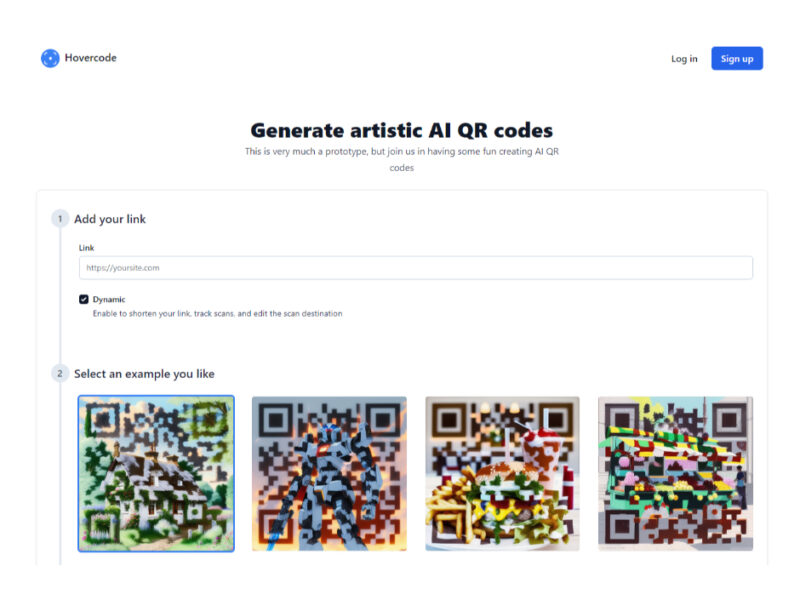
About Hovercode
Use Cases
Use Case 1: Seamless Brand Integration for High-End Advertising
Problem: Traditional black-and-white QR codes are often considered "eyesores" that disrupt the visual flow of high-quality print ads, luxury posters, or magazine spreads. Marketers often have to hide them in corners, reducing scan rates.
Solution: Hovercode allows marketers to generate QR codes that function as high-quality artwork. By prompting the AI to match the brand’s aesthetic (e.g., "minimalist gold marble texture" or "vibrant pop-art"), the code becomes a central, integrated design element rather than a technical necessity.
Example: A luxury perfume brand creates a full-page magazine ad. Instead of a standard QR code, they generate one that looks like a delicate watercolor painting of jasmine flowers. Readers are more likely to engage with the "art," which leads them to an immersive AR fragrance experience.
Use Case 2: Dynamic Menus and Signage for Boutique Hospitality
Problem: Restaurants and cafes often use QR codes for digital menus, but standard codes feel cold and clinical in a cozy or themed environment. Additionally, if the menu URL changes, the business has to reprint all table signage.
Solution: Using Hovercode’s "Dynamic" feature, businesses can create artistic codes that match their interior decor while maintaining the ability to change the destination link at any time without reprinting.
Example: A rustic, countryside bistro generates a QR code styled as a "detailed oil painting of a quaint cottage." They print this on wooden table stands. If they switch from a PDF menu to an online ordering system, they simply update the destination link in the Hovercode dashboard.
Use Case 3: Interactive Portfolios for Creative Professionals
Problem: Graphic designers, illustrators, and concept artists need to bridge the gap between physical business cards and their digital portfolios, but a standard QR code feels uninspired on a creative resume.
Solution: Designers can use Hovercode to generate a QR code that serves as a "teaser" of their artistic style. This demonstrates technical proficiency with AI tools while providing a functional link to their work.
Example: A concept artist creates a business card where the QR code is generated using the prompt: "cyberpunk city skyline, neon lights, digital art style." When scanned, it takes the recruiter directly to their ArtStation or Behance profile.
Use Case 4: Trackable Street Marketing for Event Organizers
Problem: Event promoters post flyers across cities but struggle to track which locations or flyer designs are actually driving ticket sales. Standard codes also get ignored in visually crowded urban environments.
Solution: Hovercode’s tracking and dynamic shortening features allow promoters to create different artistic versions of a QR code for different neighborhoods or campaigns, all while monitoring scan data to see what performs best.
Example: A music festival promoter creates a "psychedelic 1970s concert poster" style QR code for flyers in a college district and a "sleek modern techno" style for downtown bars. By checking the tracking dashboard, they can see which demographic is scanning more and adjust their marketing spend accordingly.
Key Features
- Artistic AI QR code generation
- Dynamic link scan tracking
- Editable scan destination management
- Custom text-to-image artwork prompting
- Integrated link shortening service
- Pre-built artwork example templates
Similar Tools You Might Like
Discover more tools in the same category

Hypotenuse ai
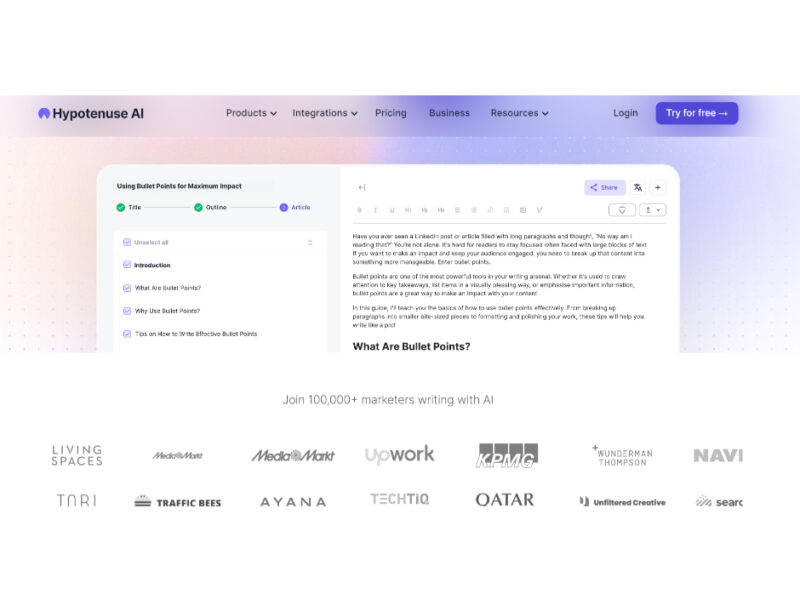
Hypotenuse AI is a state-of-the-art AI Writing Assistant and Text Generator designed to streamline and …
Live Preview:
Updates automatically with live stats
Copied to clipboard!