AutoRegex
AutoRegex is an innovative AI-driven tool that revolutionizes the way Regular Expressions (RegEx) are created. Utilizing advanced Natural Language Processing (NLP), AutoRegex allows users to generate RegEx patterns by simply …
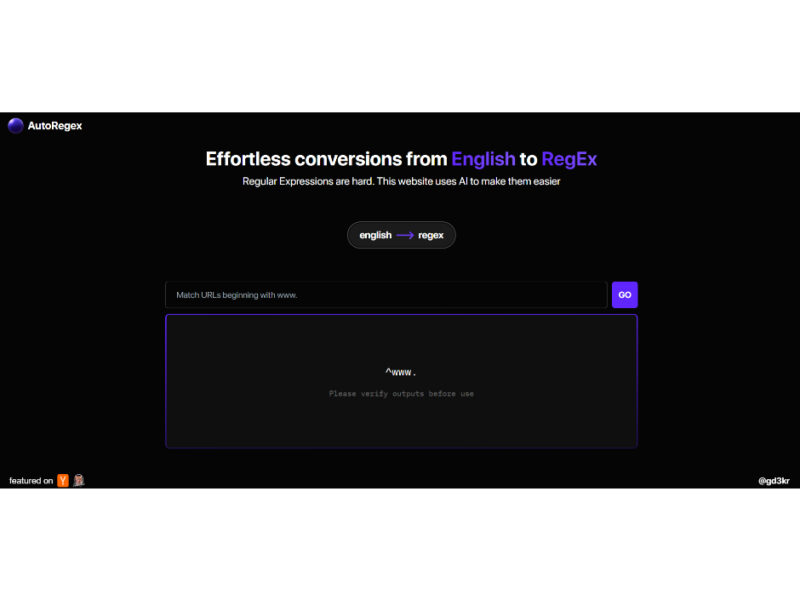
About AutoRegex
Use Cases
Use Case 1: Streamlining Complex Form Validation for Developers
Problem: Developers frequently need to implement specific input validation rules (like complex passwords, custom serial numbers, or specific international phone formats). Writing these RegEx patterns from scratch is time-consuming and prone to "off-by-one" errors or syntax mistakes.
Solution: AutoRegex allows developers to describe the validation requirements in plain English, instantly generating the necessary code snippet without having to consult documentation or use trial-and-error testing tools.
Example: A developer needs to validate a corporate ID that starts with "EMP", followed by a hyphen, then 4 digits, and ends with a capital letter. They type: "Match a string starting with 'EMP-', followed by exactly four digits, and ending with one uppercase letter." AutoRegex provides the pattern: ^EMP-\d{4}[A-Z]$.
Use Case 2: Advanced SEO and Keyword Filtering for Marketers
Problem: Digital marketers using tools like Google Search Console often need to filter large datasets to find specific "intent-based" queries (e.g., only questions or only product-specific searches). While these tools support RegEx, most marketers are not familiar with the syntax.
Solution: AutoRegex empowers non-technical marketing staff to create sophisticated filters by describing the types of search queries they want to isolate.
Example: A marketer wants to filter for users asking questions about "pricing" or "cost." They input: "Any text that starts with 'how much', 'what is', or 'price of' and ends with 'software'." AutoRegex generates the RegEx needed to filter their search data effectively.
Use Case 3: Data Cleaning and Extraction for Data Analysts
Problem: Data analysts often work with messy CSV or log files where they need to extract specific information, such as extracting dates in varying formats or pulling out specific SKU numbers from a long string of product descriptions.
Solution: Instead of manual data entry or struggling with complex string manipulation functions, analysts can use AutoRegex to generate a pattern that identifies the exact data points they need to extract.
Example: An analyst needs to pull out all dates formatted as DD/MM/YYYY from a text block. They type: "Find sequences of two digits, a forward slash, two digits, another forward slash, and four digits." The tool provides the pattern \b\d{2}/\d{2}/\d{4}\b, which the analyst can then use in Python or Excel.
Use Case 4: Automating Log Analysis for DevOps and IT
Problem: System administrators often need to scan through thousands of lines of server logs to find specific error events (e.g., failed login attempts from a specific IP range). Writing the RegEx to capture these specific patterns manually can be tedious during an active troubleshooting session.
Solution: AutoRegex speeds up the incident response time by allowing the admin to quickly generate a search pattern based on the log's visual structure.
Example: An admin needs to find all lines containing a "404" error that occurred specifically on a ".php" file. They type: "Lines containing '404' followed by any characters and then ending in '.php'." The tool generates the pattern, which the admin immediately plugs into a command-line tool like grep.
Use Case 5: Educational Tool for Computer Science Students
Problem: Learning Regular Expressions is a notorious hurdle for coding students because the syntax is dense and not human-readable. Many students struggle to connect the logic of a pattern to the characters used to represent it.
Solution: AutoRegex serves as an "Education Assistant" by acting as a bridge between logical thought and code. Students can use it to reverse-engineer patterns and learn how specific English constraints translate into symbols.
Example: A student wants to understand how to match an email address. They type: "A string of characters, an @ symbol, more characters, a dot, and a two to four letter extension." By seeing the resulting RegEx, the student can identify which parts of the syntax handle the "at" symbol versus the "extension."
Key Features
- NLP-driven RegEx generation
- English-to-RegEx pattern translation
- Code-free pattern creation
- Complex RegEx pattern generation
- Flexible user subscription plans
- Google and email authentication
Similar Tools You Might Like
Discover more tools in the same category



GitFluence
GitFluence is an innovative, AI-powered web application designed to streamline the process of finding and …

Explore Related Categories
Live Preview:
Updates automatically with live stats
Copied to clipboard!